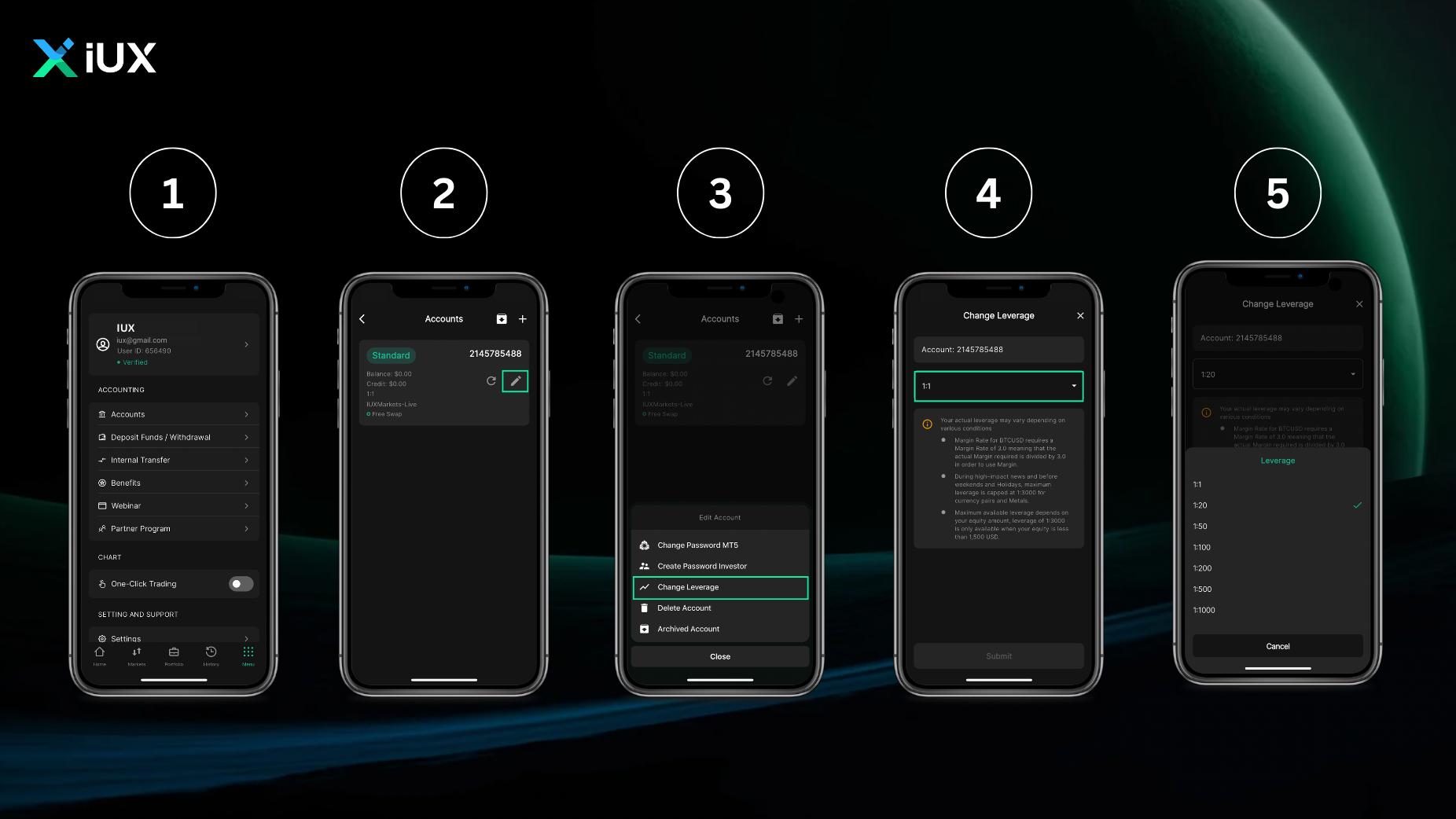
You can change the leverage on the “My Account” tab by clicking on the “Change Leverage” tab in the Member Area. This will apply the leverage change immediately, but it will be adjusted based on the available margin.
Help Center / Managing Account / Can I change my leverage?
728 views 1 August 16, 2023
You can change the leverage on the “My Account” tab by clicking on the “Change Leverage” tab in the Member Area. This will apply the leverage change immediately, but it will be adjusted based on the available margin.

Did you find your answer? We can help. Send us the topic that best describes your issue with your specific details on [email protected]
Access to this website is restricted. IUX does not solicit, market, or provide services to persons located in, resident in, or citizens of Australia, Canada, Ukraine, any European Union Member State, Iceland, Norway, Liechtenstein, the United Kingdom, the United States of America, or Malaysia.
By selecting “I Confirm” below, you expressly represent and warrant that you are not a citizen or resident of, and are not accessing this website from, any of the jurisdictions listed above. If you do not meet this requirement, you must select “I Do Not Confirm” and refrain from accessing the website.