

LotBack is a program that allows traders to receive cash back from their trades, regardless of profit or loss. Each executed order is calculated into LotBack Points, which can be exchanged for account balance. This helps to reduce losses or increase funds for future trading.
How to Earn LotBack?
You can easily receive LotBack under the following conditions:
1. Must Use Margin from Balance Only
Example:
Balance $100
Leverage 1:1000
Margin for 1 lot ≈ $100
Therefore, if you open an order that requires more margin than your available balance (e.g., more than $100 in this example), that order will not receive LotBack.
2. Orders Must Be Held for More Than 5 Minutes
- Any orders closed before 5 minutes will not qualify for LotBack.
LotBack Points Calculation
1 Point = $0.5 Balance
Example:
- If you have 100 Points, you can redeem them for:
- $50 Withdrawable Balance
Can LotBack Be Converted to Balance?
LotBack can be exchanged for either Balance under the following conditions:
1. Exchange to Balance
- The exchanged amount is calculated into the total balance.
- Example: If Balance = -20 and LotBack = $5, the new balance will be -15.
- If the balance is negative and all orders are closed, it will be reset to 0.
- Recommended to exchange LotBack to balance only when Balance = 0 or positive.
Accounts Eligible for LotBack
The accounts that participate in the LotBack program include: Standard, Raw, and Pro.
LotBack Status Levels
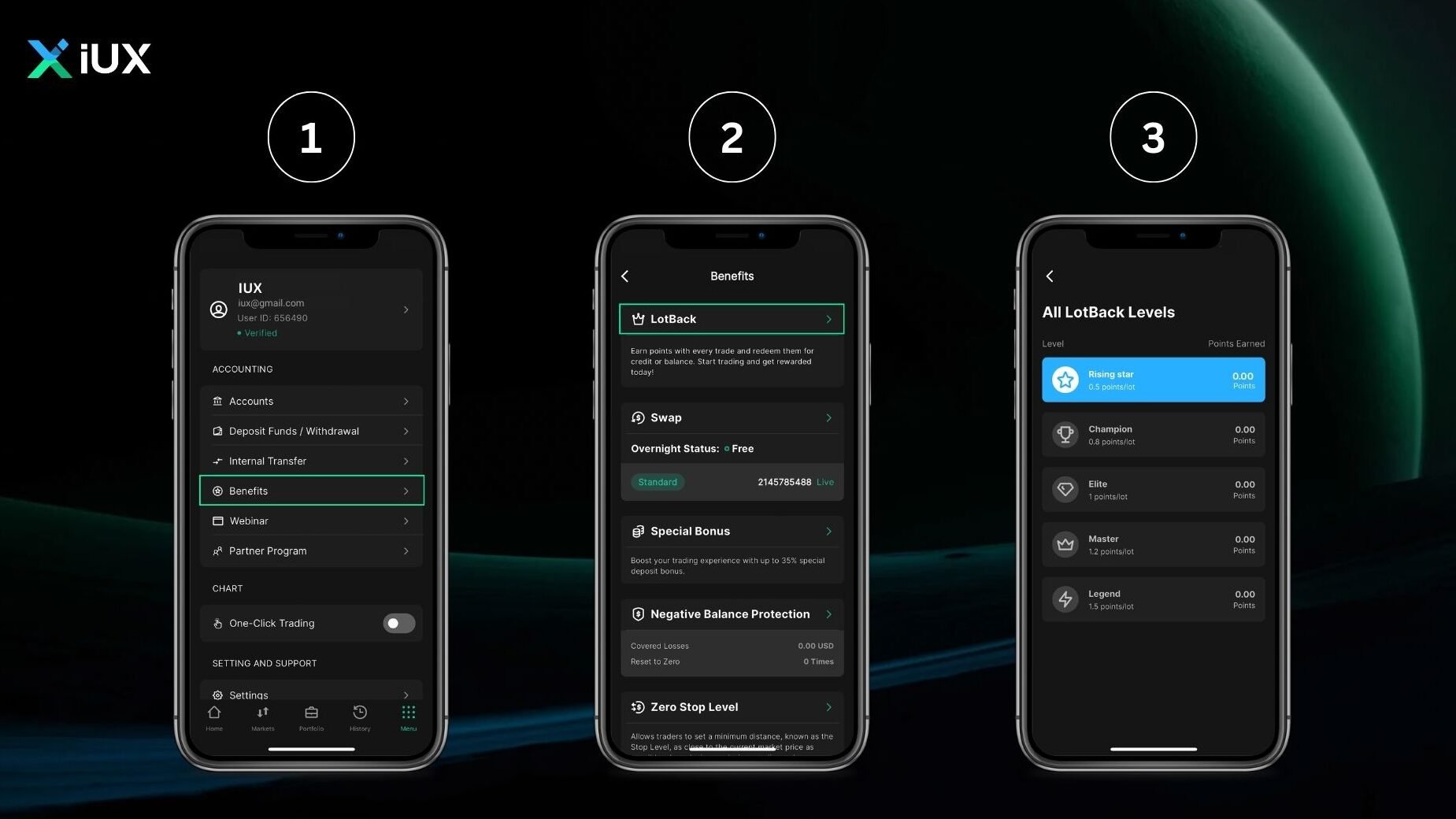
LotBack has 5 levels, which are determined based on the number of points earned per 1 standard lot:
- Rising Star: 0.5 point / 1 standard lot
- Champion: 0.8 point / 1 standard lot
- Elite: 1.0 point / 1 standard lot
- Master: 1.2 points / 1 standard lot
- Legend: 1.5 points / 1 standard lot
The higher the level, the more LotBack points can be accumulated, resulting in greater rewards.
How to Redeem LotBack on IUX App Trade
- Log in to your account.
- Go to the “Benefits” menu.
- Select “LotBack”.
- Check your current LotBack balance.
- Choose to exchange for Balance.
- Exchange to Balance: Click “Claim Cash”, enter the LotBack amount, and confirm.
You can read all of LotBack information at: Terms and Conditions LotBack.


